
SAM BalanceLab help
SAM BalanceLab 3 - Ultimate
Learn more about the Performance Parameters of the Ultimate Edition.
SAM BalanceLab 2
Learn more about the SAM BalanceLab 2 software.
This link list contains important documents for the software installation and the use of SAM BalanceLab.
Quick Installation Guide and Manual (PDF)
Performance Parameters Manual (Ultimate Edition)
Data Curves Manual (Ultimate Edition)
Launch Monitor Integration:
Software key/ Activation issues
Where can I find the software serial key?
When you start the SAM BalanceLab software for the first time you have to enter the software key provided with the system. You will find it on the registration document which came with the system.
If you have lost your activation code contact support@scienceandmotion.com with the serial number of your SAM BalanceLab pressure plate.
SAM BalanceLab software license key is lost or can not be found
If you have lost your activation code contact support@scienceandmotion.com with the serial number of your SAM BalanceLab pressure plate. The serial number (SN) is printed on the left side next to the cable outlet:
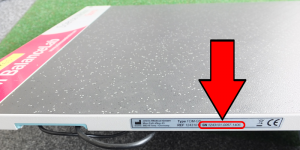
After you have contacted us, we will generate the download link and activation code for you as soon as possible.
What to do if the registration (software license key) does not work
Basically there are three different messages that can occur in case of an error during registration:
- “The software key … is not valid key for this product!”
- “The software key … is not valid for the device SN: …”
- “BalanceLab Hardware Detection Error”
If one of these messages occurs, please read the “BalanceLab Software Key” document and follow the instructions therein:
BalanceLab Software Key document (PDF)
Operate a new or different BalanceLab plate with existing software
The SAM BalanceLab software licenses are bound to the BalanceLab hardware (pressure plate). For each pressure plate you will need a valid software key to operate the hardware with your installed software. Up to 4 pressure plates can be registered in one software installation to make it possible to use different hardware with one computer easily.
For activation of a new or further SAM BalanceLab hardware to your registration, please read the “Add New Hardware” document and follow the instructions therein:
Add New Hardware (PDF)
Import of BalanceLab version 1.x data into BalanceLab 2 or 3 software
Depending on where BalanceLab 1.x data is stored, different steps will be needed to import the data.
Please read the “Import BalanceLab version 1 data” document and follow the instructions therein:
Import BalanceLab version 1 data (PDF)
How to connect the BalanceLab 2 / 3 to Trackman and Flightscope launch monitor models
The Add-On package for launch monitor integration will allow the BalanceLab 2 / 3 software to connect to several Trackman and Flightscope launch monitor models. The Add-On will only be available in the BalanceLab Pro software edition.
If you do not have the Pro edition please contact us by email to sales@scienceandmotion.com or use our contact-form
If the launch monitor system is connected to BalanceLab software, launch data will be transferred for each swing and displayed in the BalanceLab recording and replay screen as a data table. If a swing is recorded by BalanceLab and launch data for this swing is transferred in parallel, the data will be stored into local database of BalanceLab. The data will then be available when the record is opened in replay.
For more information please download the Launch Monitor Addon Setup Guide for Trackman 4 (PDF).
Further support
SAM BalanceLab hardware status light description
Information on the different hardware connection states signaled by the status LED. Please see the PDF for details::
LED Status Information (PDF)
How do I send back a defective unit / item?
You can help to ensure that your package arrives safely and on time. Here are some general packaging guidelines that will help you prepare your package for shipping.
Please download the “Packaging and Shipping Guideline” document and follow the instructions therein:
Packaging and Shipping Guideline (PDF)
How can I install the SAM BalanceLab software on my computer?
Just put the USB data stick into your computer, the installation program should start automatically. If it doesn’t start the “Setup.exe” file from the data stick manually. The installation program will guide you through the installation process.
Note: Install the software before connecting the USB plug to your computer!
What size is the SAM BalanceLab pressure plate and what are the environment requirements for the system?
To see the exact dimensions of the SAM BalanceLab and the floor and computer requirements for the installation, please open the “BalanceLab Facts” document:
BalanceLab Facts (PDF)
How many sensors has the SAM BalanceLab pressure plate?
The SAM BalanceLab is a high end technology and is using 2560 capacitive pressure sensors, which are much more accurate as compared with the cheap resistive sensors.
Which extension cables work with SAM PuttLab?
In general USB cables longer than 3m/10 feet can cause problems. Most specifications guarantee proper work up to this distance. Additionally there is a dependence on the computer you use. For some models long cables work, for others they do not. SAM BalanceLab is powered by USB, so the power the USB port delivers through the cable must be sufficient to drive the BalanceLab pressure plate. At the same time communication is running and needs to be stable all the time.
We have active USB extension cables available in 5m/15ft and 10m/30ft. The 15ft cable should do the job in most of the cases. Together with the original 3m cable you get a total distance of 8m/25ft. You can order the cable extensions from us directly or we can do recommendations for buying in the USA.
The Price of the extensions is not critical, if we ship from Germany to countries outside the EU the international shipping cost will be the biggest part. We would estimate a total cost of $90 with UPS shipping. We only can guarantee function for cables we know as we cannot test all different extensions out there in the market.
If you want to buy the cable extension yourself, please download the “USB extension cables” document and order the recommended cables therein:
Download USB extension cables document
If you want to order the cable extension from us directly, let us know which the total distance is and what preferences you have. Please contact us by email to sales@scienceandmotion.com or use our contact-form
What's new in the different software versions of SAM BalanceLab?
The latest software version is SAM BalanceLab 3. All features of the older versions (SAM BalanceLab 1.x and BalanceLab 2) are also available in SAM BalanceLab 3.
To get detailed information about the features of SAM BalanceLab 3 Pro editon, please download the following document:
New Features BalanceLab 3 Pro (PDF)